The gift lands.Your screen celebrates.
Every rose, every lion, every new follower gets its moment: leaderboards drawn by artists, a jar that fills in front of everyone, alerts that tell each supporter "we saw that". Pick the look — it's on stream seconds later.
No card needed. Seven days with everything on, then you decide.
Thank you Omar!
- card designs
- 30+card designs
- jar themes
- 24+jar themes
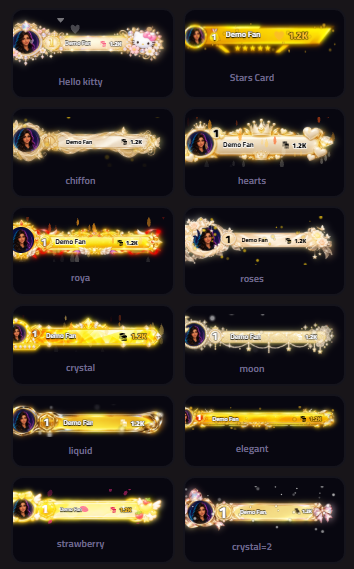
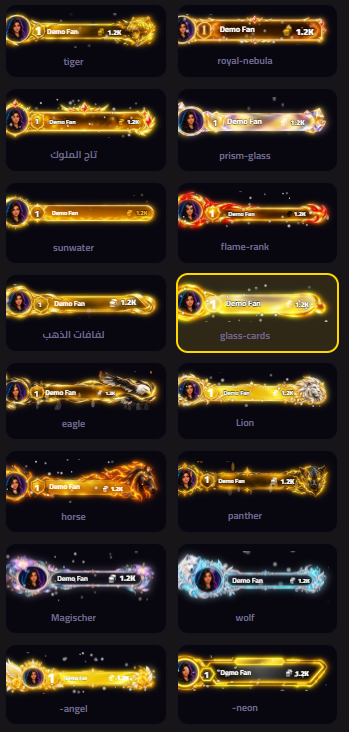
- frames & name plates
- 50+frames & name plates
- fonts
- 107+fonts
- live tools
- 39+live tools
What happened in the last 30 days
LiveReal numbers from creators streaming on RUNLIVE.
- Likes
- 10,066,489
- Comments
- 136,902
- Coins
- 532,778
- New followers
- 1,350
- Gifts
- 7,099
Every rose that lands, every follower who walks in, every supporter who stays until the end of the live deserves to be seen on screen. So we built tools that let your stream see your crowd the way you do.
No templates. Boards someone drew by hand
What you see here is exactly what your viewers will see. Pick a design, give it your colours, and let it do the rest.
Every gift falls with its own weight
A rose drops in like a pebble; a lion takes a corner to itself. A glass jar with real physics fills up in front of your viewers, and every gift gets you one step closer to tonight's goal.
- Nine jar shapes
- A drawn theme for every shape
- Your top supporter hanging from the lid
- Rising liquid and floating bubbles
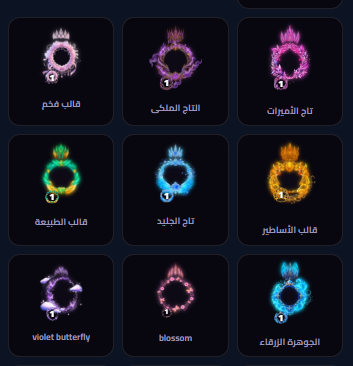
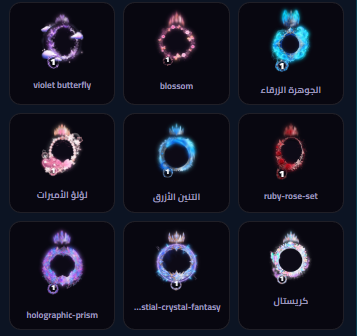
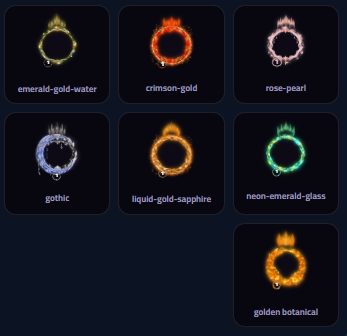
The people who back you deserve a crown
Animated frames and name plates that make your top supporter's name the first thing anyone sees.
39 tools, one dashboard that runs them all
Each tool is one link you paste into OBS or TikTok LIVE Studio once. After that, every change shows up on stream instantly — no reloads.
What your viewers see
Leaderboards
Who gave the most? A board that says it in five layouts, with every supporter in the spot they earned.
Gift jar
Gifts drop into a glass jar and fill it, and everyone can see how close the goal is.
Goals
Set a number and let your viewers watch the bar close in on it, one like at a time.
Heart goal
A heart that fills with every "Heart Me" gift — and raises its own goal when it's full.
Gift gallery
Every gift of the night on show: a spinning ring, a strip, an album or a list.
Gift slider
A moving showcase of what your viewers can send you, each gift with its price.
Latest events
Latest follower, latest gift, latest supporter. They rotate on their own, so nobody gets forgotten.
Live viewers
Pick a viewer and put them in the spotlight, along with everything they did on stream.
Widgets
Counters that jump with every like, follow and gift — plus a card for your accounts everywhere else.
Custom text card
Your own words over your own backdrop, changed from your phone mid-stream.
Stream timer
A plain countdown, or a subathon where every gift and like adds time.
News banner
The latest event as breaking news, with a clock and a ticker that never stops telling what's happening on your stream.
Backgrounds
A full-screen backdrop, image or video. One link in OBS, and you swap it mid-stream with a tap.
Social accounts
Your accounts take turns on screen, one after another, so everyone knows where to find you.
Donation goal
The heart goal's shapes and motion — filled by donations from Streamlabs and your other sources.
Ready-made designsNew
No time to design? Pick a ready look for leaderboards, events, accounts or interactions — and undo it in a click if it's not you.
Podium name platesNew
Under every supporter's portrait, a plate for their name and score: bows, blades, runes, shields — glowing and moving in your colours.
When the crowd joins in
Interactive alerts
One gift is enough to fire a video, a sound and a thank-you card — across eight screens that each run on their own.
Gift fireworks
Big gifts don't go by quietly — they burst into fireworks, sound and all.
Flying likes
Every real wave of likes turns into hearts sweeping across the screen.
Comment displays
Like a comment? Lift it from your phone onto the screen — and have it read aloud if you want.
Soundboard
Your sounds on a pad on your phone: one tap and the stream hears it.
Music requests
Viewers request songs from chat; you decide what plays.
Chat bot
Thank-yous, replies and commands in TikTok chat that send themselves while you're busy streaming.
Live roomNew
Every live comment in front of you, next to the gifts, follows and shares — mute and ban right there.
Giveaway
Viewers type the entry word in chat, and you draw the winner while everyone watches.
Live poll
Ask your crowd; they vote with the option's number in chat or with the gift tied to it.
Voice reader
Comments read aloud during the live — you choose whose, and how.
Alert library
Hundreds of ready alert videos, sorted into categories. Pick one for any interaction instead of making your own.
Welcome back
When a regular from your past streams comes back, a welcome card greets them on screen.
Prayer times
An alert on your live at every adhan, by your city's prayer times.
What stays after the live
DonationsNew
Streamlabs, Whop, even a transfer you log by hand — the screen celebrates them like gifts.
Your public page
One link with your name that gathers your accounts and your donation link — and shows "live now" by itself when you go live.
Scene
All your tools in one scene and one link, instead of eight sources in OBS.
Analytics
How did tonight go? Peak viewers, comments, new followers and diamonds, session by session.
Windows app
Your add-ons and media library, running straight from your PC.
Top supporters
Who really stood by you across every stream, in order — updated after each live.
Stream recap
When the stream ends, its numbers become a story image ready to share with your followers.
Background remover
Remove the background from any clip and save it transparent, ready for OBS and your interactions.
From sign-up to live in three steps
- 01
Connect your account
Type your public TikTok username. No password, nothing else.
- 02
Pick what tonight needs
Leaderboards, the jar, alerts, polls… switch on what you need and leave the rest for another night.
- 03
Copy, paste, go live
One link per element in OBS, and every edit reaches the stream the moment you save it.
Choose your plan and try before you pay
Start with the free trial, and choose a plan once you know what your stream needs.
Free plan
Free one-week plan
- Streaming tools
- Leaders
- Interactions
7 days free, then $0/month
The Golden Plan
- Streaming Tools
- Top Contributors
- Interactions
- Comments
7 days free, then $4.99/month
The Diamond Plan
The Premium Streamer Plan
- Streaming Tools
- Leaderboards
- Interactions
- Comments
- Comment Bot
- Music Player
- Premium Themes
7 days free, then $9.99/month
Tonight, make your viewers ask: how did you do that?
Seven free days is enough to see the difference from your very first stream.
Start now — it's free